
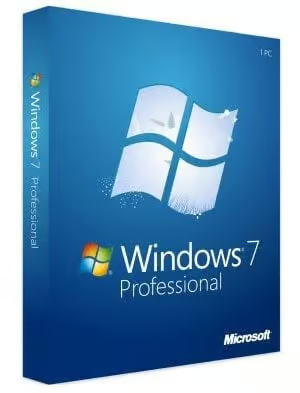
Microsoft Windows 7 OEM Professional PC Microsoft Key GLOBAL
$16.19 Free digital delivery via email
In stock
- 30-day guarantee
- Secure Payments
Description
New features, great feel – This is an Operating System that feels good to use. Developer is committed to delivering a transcendent computing experience when they released Windows 7 Pro. Their prior release, Windows Vista, was poorly received by both critics and the public. Determined not to repeat this mistake, Windows 7 Professional was released. It is the fruit of an exceptionally talented team’s hard work. The taskbar you know and love is back. You can pin your favorite programs or applications to it for easy access. Share files using the HomeGroup and manage with ease thanks to the updated User Account Control system. The programs you know and love are still here as well. Internet Explorer 8, Windows Media Player, and Windows Media Center come pre-loaded. This is the OS you’ve been waiting for.
Business and pleasure – Your computer will be an efficient business machine once you install Windows 7. Features like support for up to 192GB of RAM, Remote Desktop operations, geo-recognition printing, localized network backup, a secure file encrypting system, Windows XP Mode, and Presentation Mode make this Operating System perfect for big business, small business, and even students. Windows 7 Pro is designed specially for use by business professionals, but that doesn’t mean it can’t be used after working hours. Play games up to DirectX 10 with support for multimedia and even 3D! Your computer is a powerful tool and you can unlock its full potential by buying this product today.
The most popular OS – While Developer continues its quest to offer the most comfortable computing experience by releasing new Operating Systems like Windows 10, Windows 7 Pro is still the top choice for millions of computer users around the globe because it is easy to navigate and is still remarkably functional despite the fast pace of technological modification that has become a hallmark of the modern era. Nearly half of all Operating Systems installed on computers around the world are reported to be Windows 7 according to NetMarketShare. Become part of the global sensation. Get an OS that is trusted and used by millions. Buy Windows 7 Pro now.
NOTE: This is the Professional version of Windows 7 operating system, for the full list of features and functionalities please see this website.
Warning! This product cannot be used to upgrade your system from other version!
Additional information
| Age Rating | 3 |
|---|---|
| Platform | Other |
| Region | GLOBAL |
| Windows minimum requirements | <strong>Minimum:</strong><ul class='bb_ul'> |
Activation Guide
WINDOWS 7 ACTIVATION
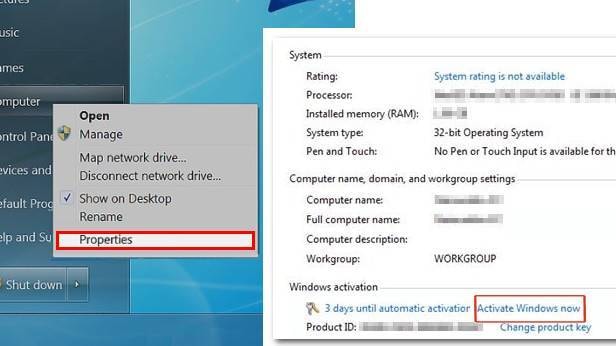
- Select the Start button icon, right-click Computer, select Properties, and then select Activate Windows now.
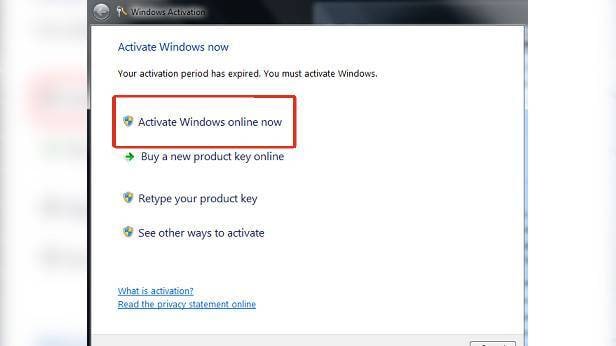
- If Windows detects an internet connection, select Activate Windows online now. You might be asked for an admin password or to confirm your choice.
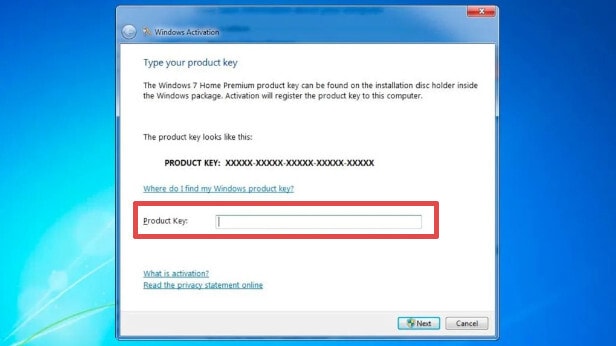
- Enter your Windows 7 product key when prompted, select Next, and then follow the instructions.
By Phone
- Select the Start button icon, right-click Computer, select Properties, and then select Activate Windows now.
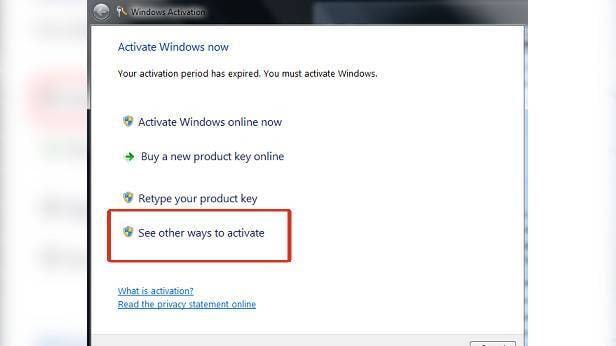
- Choose “See other ways to activate”.
- Enter your Windows 7 product key, and then select Next.
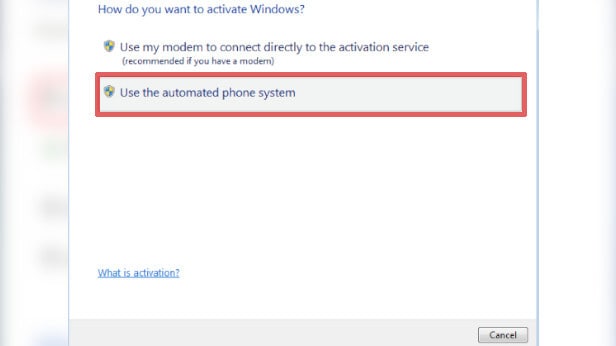
- Select Use the automated phone system. You may be asked for an admin password or to confirm your choice.
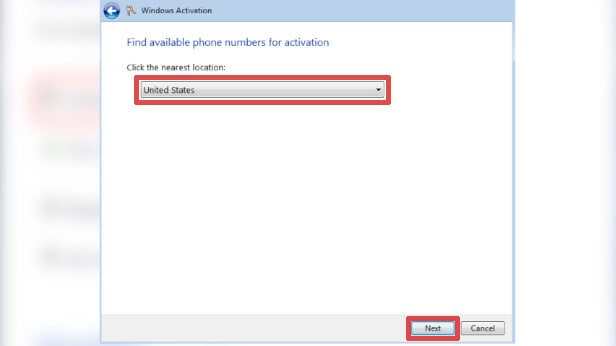
- Select your location (or the location nearest to you) from the drop-down list, and then select Next.
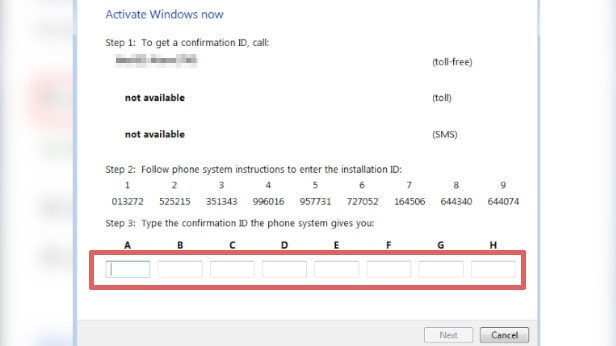
- Call one of the available phone numbers listed. An automated system will guide you through the activation process.
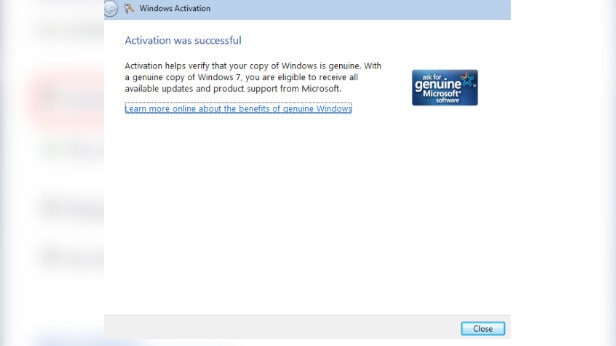
- After you type the Confirmation Id into the approtiate input boxes, the Next button will enable for you to select.
- After you click the Next button, Windows will match the installation id of the system and the confirmation id from your input and will complete the activation if the matching is successful.

Reviews
There are no reviews yet.